Québec · Practical guide
How to complete a joint accident report in Québec
A joint report records the people, vehicles and circumstances involved. This guide explains how to select the Québec layout, check both sides and keep preparation separate from your insurance claim.
Record known facts and check differences before signing. Immediate danger or injury calls for help before documentation.
1. Record the place and time
Use the actual date, time and location of the accident. Check the country, street and town before continuing: the event location determines the document layout. Only add information about injuries or witnesses that you know.
2. Keep vehicle A and B separate
Agree which vehicle is A and which is B and use that assignment throughout. Record vehicle, driver and policyholder details separately; these may be different people. Check the policy number against the insurance document rather than guessing.
3. Describe the circumstances
Complete the circumstances for each vehicle. Describe what you observed, the movements and directions. Avoid conclusions about fault. Use a sketch to clarify positions, keeping A and B consistent with the rest of the record.
4. Review both sides
The other person can join through an invitation link or QR code. You can also share one phone. Read both sides back and flag mistakes during review. Discuss differences before either person signs.
5. Sign the checked version
Check names, plates, insurance details, location, circumstances and sketch again. Each participant should review their own information. A signature should not be used to skip an unresolved difference about the facts.
6. Keep the PDF
Download the PDF and check that it is readable. Save your own copy and ask your insurer which supporting documents and submission channel they need. The tool does not automatically file a claim or send the record to an insurer.
Use the actual accident location
The Québec layout is selected when the accident location is in Canada and its postal code begins with G, H or J. Check the location and postal code before continuing. Selecting English or French on this website does not, by itself, select the Québec document.
GAA’s report and this independent tool
The Groupement des assureurs automobiles provides its own online joint-report service. Crashform is independent of GAA and does not represent that service. Read GAA’s instructions and ask your insurer whether our document contains what they need for your circumstances.
Save the report and follow up
Check driver, vehicle, insurance and event details together. Keep the PDF with your records and use your insurer’s claims channel. A downloaded report is not a submitted claim and does not replace any separate notification required by the authorities.
DEMO
Read the example
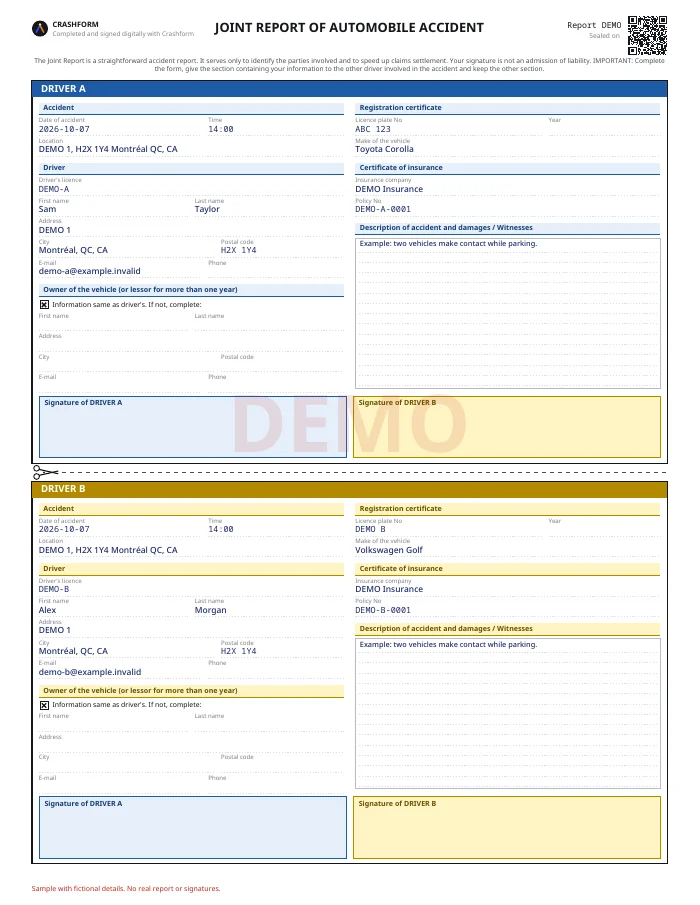
In the fictional example, two vehicles make contact while parking. Find A and B in the PDF. Compare names, plates, date and location with the description. Then check whether the sketch and selected circumstances tell a consistent story. The DEMO document contains no real signatures and is not intended for submission.
View sample PDF ↗Check before signing
- Registration plate and vehicle details
- Insurance certificate or policy number
- Driving licence and contact details
- Date, time and location of the accident
- Description, sketch and any witnesses
Preparing a document is separate from filing a claim. Crashform does not decide liability or guarantee acceptance by every insurer.
Sources and next steps
Local sources consulted on 8 October 2026. This guide describes our tool; it is not an insurer review or endorsement. Follow current instructions from your insurer and the relevant authorities.