United Kingdom · Two drivers. One document.
Your accident details,
together.
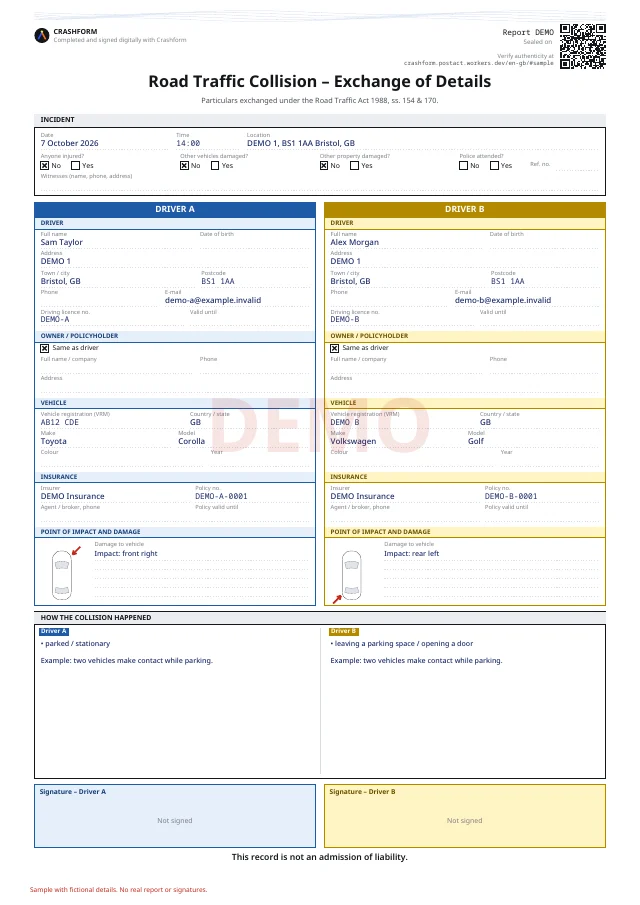
Exchange driver, vehicle and insurance information after a collision in the United Kingdom. Review a shared record and download an A4 PDF.
No app or account
 Accident information exchange · DEMO
- 25 languages
- PDF by country
- No app or account
United Kingdom · The local document
Accident information exchange
For the United Kingdom, Crashform produces an A4 record of exchanged accident details. This is separate from any notification your insurer or the authorities may require.
Preparing a document is separate from filing a claim. Crashform does not decide liability or guarantee acceptance by every insurer.
Practical guide
What details to exchange after a car accident in the UK
Exchange details before preparing a claim
GOV.UK explains the duties following an accident and the distinction between exchanging information and reporting. Gather names, contact information, vehicle registration and insurance details that are relevant to your situation. Use the official guidance for reporting duties rather than treating this record as a completed notification.
An A4 record, not a police filing
Crashform produces an A4 record of exchanged details. The document is independent of police and insurer systems. Check the date, time, location and both vehicles before saving it. Creating or signing a PDF does not mean you have notified the police or your insurer.
Licence, registration and evidence
Check names against the information each driver supplies, and keep the registration attached to the correct vehicle. Describe what you observed and use a sketch for positions and direction. Keep any separate evidence safely; photo upload and automatic insurer submission are not part of this tool.
How it works
From details to a shared document.
- 01
Invite the other person
Share a link or let them scan the QR code. You can also share one phone.
- 02
Complete your own part
Record the vehicle, insurance, driver and what happened.
- 03
Check and sign
Review both parties’ details. Flag mistakes before signing.
- 04
Download your PDF
Keep the document and ask your insurer how to submit it.
View sample PDF
This is your document.
Sample with fictional details. No real report or signatures.
View sample PDFHave these details ready.
- 01Registration plate and vehicle details
- 02Insurance certificate or policy number
- 03Driving licence and contact details
- 04Date, time and location of the accident
- 05Description, sketch and any witnesses
FAQ
Before you start.
Does this report the accident to the police?
No. Use the relevant official reporting channel and follow GOV.UK guidance for your circumstances.
Is this a European accident statement?
For a UK accident the tool creates an exchange-of-details record, rather than the European joint-statement layout.
Do we need to speak the same language?
No. Each person chooses from the available languages. The details belong to the same report.
Do I need to install an app?
No. Crashform works in your browser. You do not need an account to start a report.
Will my insurer accept the PDF?
Ask your insurer which documents and submission method they require. Crashform does not guarantee acceptance by every insurer.
Does Crashform decide who is liable?
No. You record details and circumstances. The document does not decide liability or compensation.
Sources and next steps
Local sources consulted on 8 October 2026. This guide describes our tool; it is not an insurer review or endorsement. Follow current instructions from your insurer and the relevant authorities.
Safety first. Then the report.
Start once everyone is safe and you can record the details.
Start a report